
USB Outlet Installation: USB-A vs USB-C, Cost, and Code
Key Takeaways
- USB outlet installation does not require a dedicated circuit. Your existing 15A or 20A branch circuit handles the load.
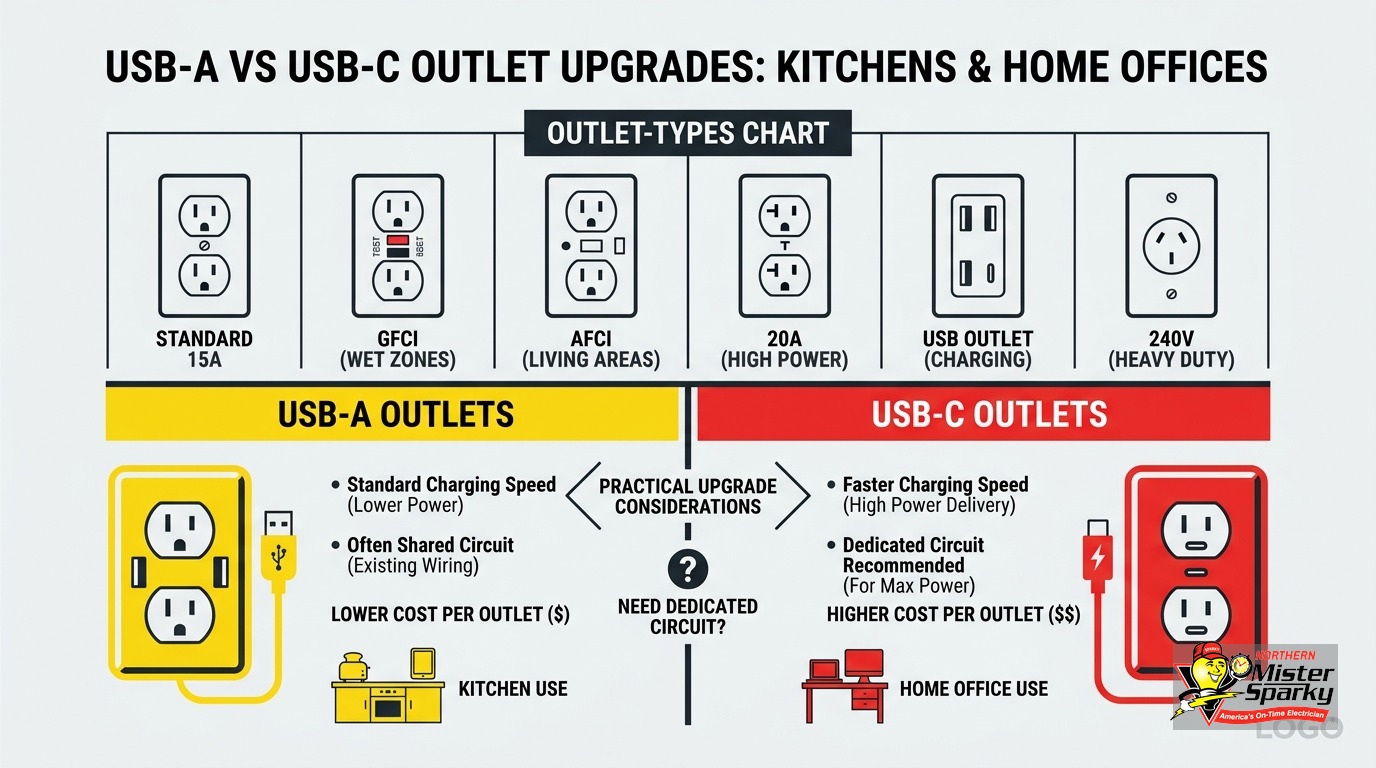
- USB-C charges faster than USB-A and is the better long-term choice for any new installation. Nearly all new phones, tablets, and laptops ship USB-C only.
- USB-only outlets with no standard plug slot are NOT subject to GFCI requirements in the kitchen under the NEC. Combo units that include a standard 120V slot ARE.
- Minnesota adopted the 2026 NEC on August 17, 2026. All permitted electrical work filed now must comply with the updated code.
- Installed cost runs $160-$380 per outlet in the Twin Cities. Bundle multiple outlets in one visit to reduce the per-outlet price significantly.
- Call 763-200-5956 or book online to schedule. We pull the permit, handle the inspection, and back every job with the UWIN(R) 100% satisfaction guarantee.
USB outlet installation is one of the most requested electrical upgrades in Twin Cities kitchens and home offices. Put a charging port right on the wall and you eliminate the adapter block that hogs the plug. But the decisions and code requirements are less obvious than most guides let on.
This post covers the questions that actually matter. Do you need a dedicated circuit? Which type charges faster? Does the kitchen GFCI rule apply? What does a licensed Twin Cities electrician charge? And what does the new Minnesota code require after this August’s adoption?
If your home has standard modern wiring, USB outlet installation is a fast, affordable job. The decisions you make before the appointment matter more than the installation itself.
Does USB Outlet Installation Require a Dedicated Circuit?
No. USB outlets operate on your existing 15A or 20A branch circuit. They draw power only when a device is charging. Even a fully loaded USB-C outlet barely registers on your panel. A dedicated circuit would be unnecessary and overkill.
This question comes from a reasonable place. High-draw appliances, including refrigerators, dishwashers, and microwaves, do require dedicated circuits. USB outlets are a different category entirely.
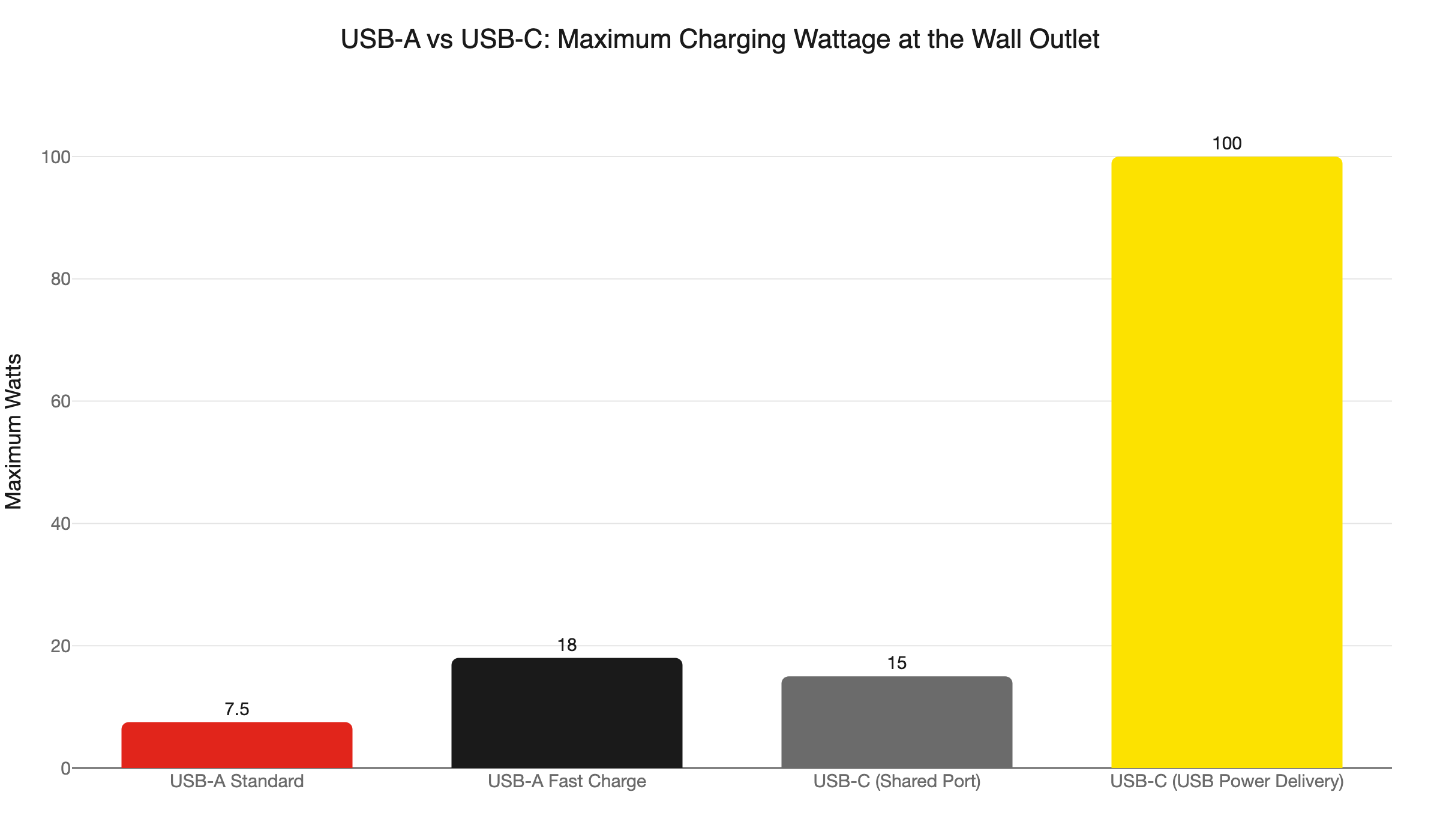
A USB-A outlet at full fast-charge capacity tops out at 18W. A USB-C outlet with USB Power Delivery can deliver 100W or more. But a 15A branch circuit carries 1,800W of capacity. Even four USB outlets running simultaneously at their rated maximum would use less than 10% of that. There is no load justification for a dedicated circuit.
The relevant check is different. If the branch circuit you are tapping already runs near capacity, an electrician will verify headroom before adding outlets. That check is quick. If the circuit is overloaded, pulling a new one may be the answer. But that is the exception, not the rule.
Plan your USB outlet locations first. Then let an electrician confirm the existing circuits can support them. In most Twin Cities homes with a properly sized panel, they already can.
USB-A vs USB-C: Which Type Is Right for Your Home?
USB-C. For any new USB outlet installation today, USB-C is the clear choice. Most phones, tablets, and laptops shipped after 2024 are USB-C only. USB-C delivers more power, scales to laptop-level wattage, and won’t be obsolete in five years.
Here’s the wattage breakdown in plain terms:
- USB-A standard: Up to 7.5W. Adequate for overnight phone charging. Slow for tablets. Cannot meaningfully charge a laptop.
- USB-A fast charge: Up to 18W with proprietary fast-charge protocols. Better, but still capped.
- USB-C (standard combo outlet): 15-25W total across all USB ports on the unit. Solid for phones, tablets, and earbuds.
- USB-C with USB Power Delivery (USB-PD): Scales voltage dynamically between 5V and 20V. Reaches 65-100W or more. Capable of charging laptops and monitors.
One number misleads buyers: the “total USB watts” figure on the box. A unit labeled “25W total” across two USB-C ports delivers only 12-15W per port when both are in use. If a laptop expects 20W or more from USB-C, you may get a slow charge. Or no charge at all.
The fix is to check the per-port wattage spec, not just the combined total. Outlets rated at 30W per port cost more, but they deliver what your device actually needs.
EU mandates drove USB-C adoption across all phones by December 2024 and all laptops by April 2026. Every major manufacturer now ships USB-C as the primary port. If you are installing outlets today, USB-C future-proofs the investment. An outlet installed this fall should still be relevant a decade from now.
Some homes have occupants who rely on USB-A accessories. A combo outlet with one USB-A port and one USB-C port is a practical middle ground for those households.
Does a USB Outlet in Your Kitchen Need GFCI Protection?
It depends on the outlet type. USB-only outlets with no standard 120V slot are not classified as receptacles under NEC Article 100. They are not subject to kitchen GFCI requirements. Combo units that include a standard 120V plug slot ARE receptacles and must comply with GFCI rules in kitchen locations.
This distinction matters because most homeowners assume all outlets near sinks or countertops need GFCI protection. That is true for standard receptacles. It is not automatically true for USB charging units. The difference affects both the cost and the wiring method.
Under NEC 2023 Section 210.8(A), GFCI protection applies to all kitchen receptacle locations, not just countertop areas. The 2026 NEC carried this requirement forward. But the rule applies to receptacles specifically. A USB-only wall unit has no 120V slot and falls outside the NEC’s receptacle definition. The code does not require GFCI for it.
Here is how it breaks down by outlet type:
- USB-only outlet (USB ports only, no plug slot): No GFCI required by code. Simpler wiring. Often lower hardware cost.
- Combo USB + standard outlet (USB ports plus a 120V slot): The 120V slot triggers GFCI requirements in kitchen locations. The installer uses a GFCI outlet or a GFCI breaker upstream.
Our electricians confirm which type you have chosen and wire it correctly the first time. Missing the GFCI requirement on a combo unit is the most common mistake in DIY installs. It creates a code violation and a potential shock hazard.
For a full breakdown of where GFCI protection is required in Minnesota homes, see our GFCI outlet requirements guide.
What Should You Look for When Buying a USB Outlet?
Start with per-port wattage, not the combined total printed on the box. Also confirm the circuit amperage rating, UL listing, and whether the unit is tamper-resistant. For kitchen locations, check that the outlet matches your circuit’s 15A or 20A rating before purchasing.
Here are the specs worth confirming before you buy:
Per-port wattage, not total wattage. A “45W total” unit with two USB-C ports may spec at 25W per port when one is in use and 20W per port when both are active. For phone and tablet charging, 12-18W per port is fine. For laptop charging, 25W per port is a reasonable minimum.
Circuit amperage match. Most USB combo outlets are rated for 15A circuits. If your countertop runs on a 20A circuit, which is common in kitchens, look for a 20A-rated unit. The slot configuration differs, and mismatching creates a code violation.
Tamper-resistant (TR) rating. The NEC requires tamper-resistant outlets in new construction and remodels in most occupied locations. If children are in the home, specify a TR-rated unit.
USB-C with PD or without. Not all USB-C ports support USB Power Delivery. A USB-C port without PD delivers standard wattage only. Check the spec sheet, not just the port shape.
Brand and UL listing. Leviton, Legrand, and Hubbell are brands electricians commonly trust for outlet hardware. Off-brand units from general retail vary widely in quality and may not carry a UL listing.
You do not have to pick the outlet before calling us. We can source the right unit for your location and circuit. But if you prefer to shop first, these are the specs that separate a good outlet from one that underdelivers.
What Does USB Outlet Installation Cost in the Twin Cities?
Expect $160-$380 per outlet installed by a licensed electrician when replacing an existing outlet with no new wiring required. That range covers labor and materials. Bundling multiple locations in one service visit is the single most effective way to cut the per-outlet cost.
Here is how the numbers break down:
- Outlet hardware: $20-$80 per unit. Higher-wattage USB-C outlets and combo units cost more than basic USB-A models.
- Labor: Twin Cities electricians typically charge $50-$130 per hour. A minimum service call runs $100-$200. Replacing an existing outlet takes 30-60 minutes per location.
- All-in installed cost: $160-$380 per outlet when replacing an existing outlet with existing wiring. New circuits or panel work add to that.
- Permit cost: $50-$100 in most Minnesota municipalities when a permit is required.
The biggest lever on cost is bundling. If you want USB outlets in the kitchen, home office, and primary bedroom, scheduling all three in one visit splits the trip fee across every location. The per-outlet cost drops significantly compared to three separate calls.
Northern Mister Sparky is locally owned and operated in the Twin Cities. We quote you before we start, and every job is backed by the UWIN(R) 100% satisfaction guarantee. Call 763-200-5956 or book online.
Does USB Outlet Installation Require a Permit in Minnesota?
Yes, in most cases. Minnesota requires an electrical permit for outlet replacements involving new wiring, new circuits, or AFCI and GFCI upgrades. Homeowners can pull their own permit on a single-family home they own and occupy. All permits filed now must comply with the 2026 NEC, which Minnesota adopted on August 17, 2026.
The Minnesota Department of Labor and Industry spells out these rules for homeowners:
- Homeowners may perform electrical work and pull permits on a single-family home they own and personally occupy.
- Licensed electricians are required for rental properties and any multi-family building.
- Apply for permits online at dli.mn.gov. Direct questions to dli.electricity@state.mn.us or call 651-284-5026.
- If a general contractor already pulled a building permit for your remodel, that does not cover electrical work. An electrical permit is a separate, distinct process.
The 2026 NEC is now in effect in Minnesota. Any permit filed on or after August 17, 2026, must comply with the updated code. One detail that catches homeowners mid-remodel: AFCI protection is required on all 15A and 20A branch circuits in kitchens. If the existing circuit does not have AFCI protection, a permit may require that upgrade as part of the project.
When Northern Mister Sparky handles your USB outlet installation, we pull the permit, schedule the inspection, and make sure the job passes the first time. That protects your project timeline and keeps your homeowner’s insurance valid. For more on navigating the permit process, see our guide to electrical permits in Minnesota.
Where to Install USB Outlets for Maximum Value
The best locations are where you are most likely to reach for a charging cable and find nowhere convenient to plug in. Here are the spots Twin Cities homeowners get the most from.
Kitchen countertop. The most requested location. USB outlets here handle phones, tablets, earbuds, and small accessories without occupying a plug slot that a toaster or blender needs. A USB-C combo unit at the counter gives you flexibility for both.
Kitchen island. An island outlet needs to meet NEC receptacle spacing and clearance requirements. See our guide on kitchen island outlet requirements for the specifics. If you are adding an island outlet as part of a remodel, a USB-C combo unit is a natural pairing for that project.
Home office. This is where USB-C wattage matters most. A laptop docking station or a monitor that charges via USB-C may need 45-65W. Confirm the per-port output of the outlet before purchasing. If the outlet does not meet that spec, install a standard outlet alongside it and use your own USB-C power adapter for the laptop.
Primary bedroom nightstand. USB-C is the better long-term choice here, even if overnight phone charging does not demand it. One outlet location can serve both nightstands from a single box with the right combo unit.
Mudroom and entry. A USB outlet near the door keeps phones and wearables charged at the exit point. Also useful for wireless video doorbells and cameras that charge periodically rather than hardwire.
Kids’ rooms. USB outlets eliminate loose adapters and extension cords. Use a TR-rated (tamper-resistant) unit in any room where children are present. Confirm a UL listing on whatever unit you spec.
When Should You Call a Licensed Electrician for USB Outlet Installation?
For any USB outlet installation where you want the work permitted, inspected, and guaranteed, call a licensed electrician. For older homes, rental properties, or unfamiliar wiring conditions, there is no safe shortcut.
These situations are not DIY territory:
Older homes with aluminum wiring, knob-and-tube wiring, or cloth-insulated wire. These require specialized handling before any outlet work proceeds. A standard outlet swap becomes a safety project. Our electricians can assess what’s behind the wall before any work begins.
Any location where you are unsure of the circuit load or protection type. Assuming a circuit has AFCI protection when it does not creates fire risk. Assuming it has headroom when it does not creates an overload condition.
Rental properties. Minnesota law requires a licensed contractor for electrical work on rental properties. No permit will be issued to a homeowner for a property they do not personally occupy.
Projects that include panel work or new circuits. If your kitchen remodel adds or extends circuits, USB outlet installation should be bundled into that permitted project. It is cleaner, faster, and costs less per outlet than a separate visit.
Any time a combo unit’s GFCI wiring is unclear. If you are unsure whether the circuit upstream has GFCI protection or whether the outlet you bought needs it, do not guess. A wrong call on GFCI means a failed inspection and a potential shock hazard at the countertop.
Northern Mister Sparky is locally owned and operated in the Twin Cities. We carry the America’s On-Time Electrician(R) standard and back every job with the UWIN(R) 100% satisfaction guarantee. Call 763-200-5956 or book online to schedule your USB outlet installation today.
Frequently Asked Questions
Does USB outlet installation require a dedicated circuit? +
Do USB outlets in the kitchen need GFCI protection? +
How much does USB outlet installation cost in the Twin Cities? +
Does USB outlet installation require a permit in Minnesota? +
Need an electrician now?