
Wiring for a Ceiling-Mounted Projector: Twin Cities Guide
Key Takeaways
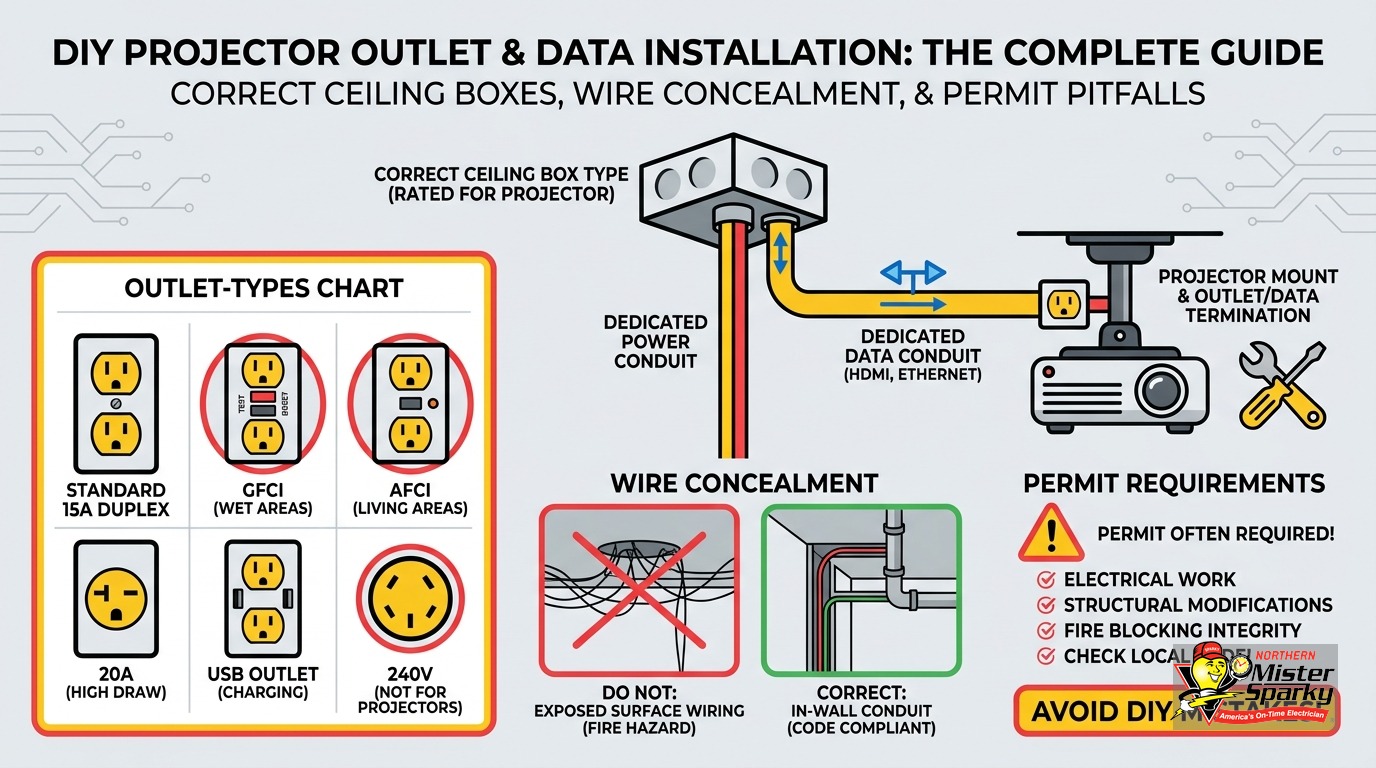
- A standard round old-work drywall box is not rated for ceiling fixture support. You need a fan-rated box on an expandable brace bar, rated for at least 50 lbs.
- In a standard ceiling cavity, CL2 or CL3 signal cable is permitted. If the cavity is a return-air plenum, you must use CL2P or CL3P instead.
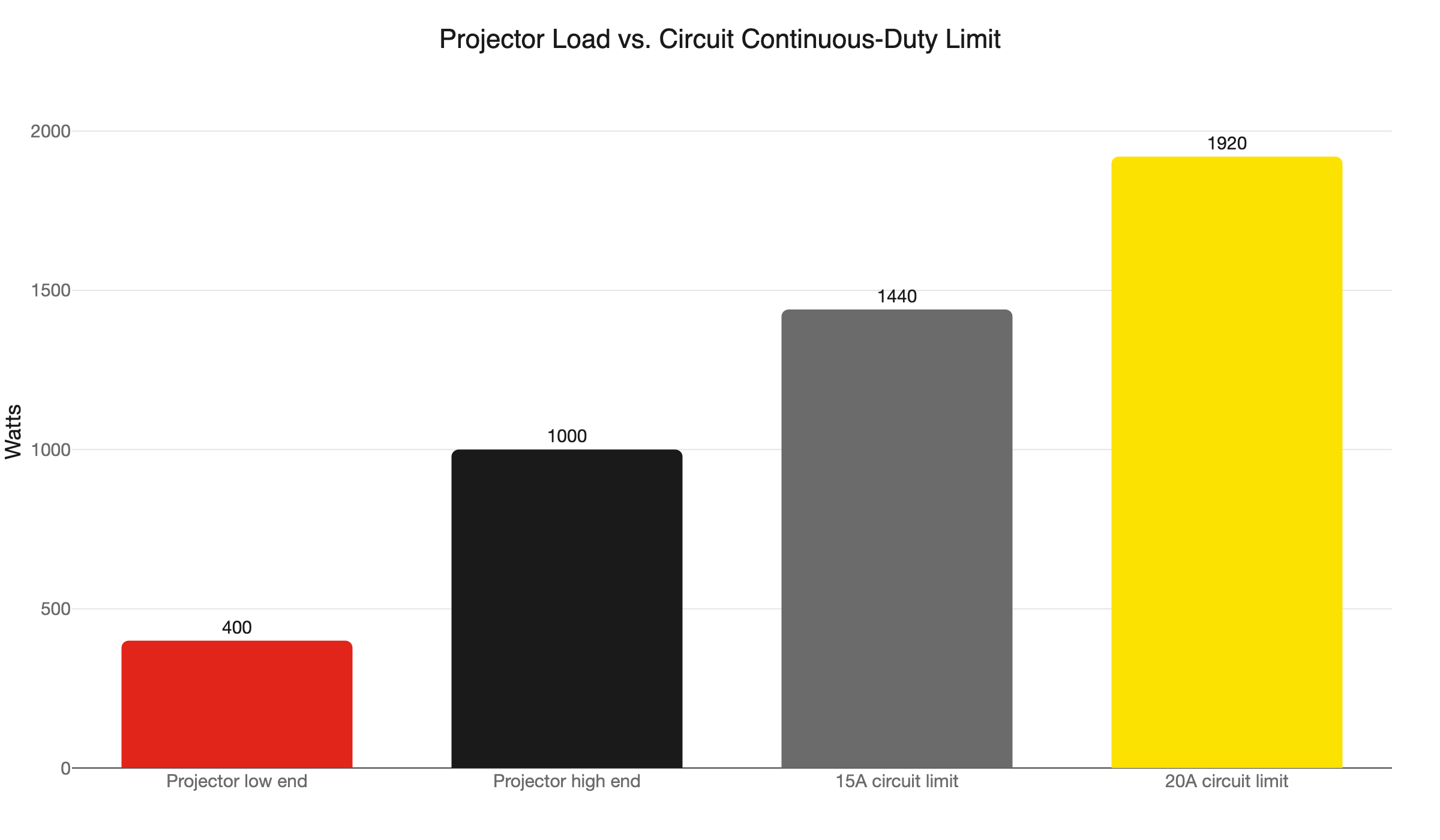
- Projectors draw 400W to 1,000W. That consumes most of a 15A circuit’s budget. A dedicated 20A circuit is the right call for most home theater installs.
- Minnesota adopted the 2026 NEC on August 17, 2026. Permits filed on or after that date must meet the 2026 edition.
- Twin Cities permit authority splits by address. Minneapolis and St. Paul run their own departments. Every other suburb files through the Minnesota DLI.
- Two inspections are required: rough-in before the ceiling closes, and final after devices are installed and the panel is energized.
What Does Wiring a Ceiling-Mounted Projector Actually Involve?
You need three things at the ceiling location: a structurally rated outlet box, a power circuit (ideally dedicated), and a path for your signal cable. Getting all three right before the ceiling closes is the job. Missing any one of them means reopening drywall later.
A typical projector install runs a new circuit from the panel to a ceiling outlet box, then routes HDMI or Cat6 signal cable from the projector location down to your AV equipment. In a finished room, everything gets fished through walls and ceilings. If the attic is accessible above, the work moves faster, but the code requirements do not change.
The three elements are interdependent. If you run the cable without the right box, you fail inspection. If you skip the permit, you lose insurance coverage and face issues at resale. Plan all three together before you cut any drywall.
The Ceiling Box Problem Most DIYers Get Wrong
This is the detail almost no online guide covers, and it is the most common inspection failure on a projector install.
NEC 314.27(A) requires ceiling outlet boxes to support a minimum of 50 lbs. Section 314.27(D) extends that requirement to utilization equipment, which includes projector mounts. The standard round old-work box sold at every hardware store is not listed for fixture support in a ceiling. You can use it in the ceiling as a junction box, but you cannot hang anything from it.
The correct retrofit solution is an expandable brace bar, the Saf-T-Brace style. It spans between joists from inside the ceiling cavity without any drywall removal, and it accepts a ceiling box listed and rated for at least 50 lbs. Pair the brace with a fan-rated box and you meet code. Pair it with a standard old-work box and you do not.
If the projector mount has long throw arms or the combined weight of the mount and projector is significant, check the box’s rated load capacity before you buy. Some heavy-duty mounts exceed 50 lbs when loaded. The box rating needs to exceed the actual weight, not just meet it.
If you are planning a similar ceiling project without existing overhead wiring, our post on adding a ceiling fixture where no wiring exists covers the same structural box requirements in detail.
How Can I Hide the Wires for My Ceiling-Mounted Projector?
The cleanest approach runs both the power and signal cables inside a flex EMT conduit fished through the ceiling cavity, with trim plates at each end. The conduit terminates at a recessed outlet box at the projector location and a low-voltage wall plate at your AV equipment.
Here is the sequence for a finished room with no accessible attic:
-
Map the path. Identify where your AV receiver or streaming device lives, then trace the shortest concealed route through the ceiling to the projector location. Use a stud finder to locate joists and plan your entry and exit points.
-
Run conduit, not just cable. Flex EMT conduit is not required by code for a residential ceiling run, but it is the single best long-term decision you can make. Cable technology changes and HDMI versions change. Running conduit now means you pull new cables in the future without reopening the ceiling. Pull both the power wire and the signal cable through the same conduit run.
-
Terminate at a rated box. At the projector location, a recessed in-ceiling outlet box on the rated brace bar gives you a clean finished look and a legal power connection. At the wall or cabinet end, a low-voltage bracket with a brush insert lets cables pass through without leaving a gap.
-
Paint before mounting. Ceiling boxes and low-voltage plates ship in white. If your ceiling is a custom color, prime and paint the plates before the projector goes up. Masking around a mounted projector is nearly impossible.
For the wall-side termination, the low-voltage plate and power kit approach is the same one we cover in our guide on running a new outlet inside a finished wall for similar in-wall wiring projects.
What Cable Rating Does a Ceiling Run Require?
In a standard ceiling cavity, CL2 or CL3 rated cable is permitted for all signal and data runs. If the ceiling void also carries return air for your HVAC system, you must use CL2P or CL3P instead. The wrong cable in a plenum space is a fire code violation.
How do you know if your ceiling is a plenum? In homes with forced-air HVAC, check whether the ceiling cavity above the room has a dedicated return-air duct. If there is no dedicated duct and air returns through the open cavity above the drywall, that cavity is a plenum. This construction was common in Twin Cities homes built in the 1990s and early 2000s. It often involves open-web floor trusses used as return-air paths. If you are not sure, pull a ceiling light fixture and look into the cavity. Our electricians check this during the same visit we run the wiring.
The same rule applies to your HDMI and Cat6 cables specifically. Buy in-wall rated (CMR minimum) or in-ceiling rated (CMP if plenum) versions of those cables. An inspector following the 2026 NEC can reject non-rated data cables on the spot. Buying the right cable upfront costs a few dollars more and saves a failed inspection.
Does a Ceiling Projector Need Its Own Dedicated Circuit?
The NEC does not mandate a dedicated circuit for entertainment equipment, but projectors draw significant power continuously. Sharing that load with other devices on a 15A circuit leaves almost no headroom. A dedicated 20A circuit is the right call for most installs.
A 15A circuit can carry a continuous load of 1,440W, which is 80% of its rated capacity. A projector running at 800W consumes more than half of that before you add a receiver, screen motor, streaming device, or any other equipment sharing the circuit. A 20A dedicated circuit gives you 1,920W of continuous capacity - enough for a full home theater load with room to spare.
Two wiring details catch DIYers when they run a 20A dedicated circuit:
Wire gauge. A 20A circuit requires 12 AWG wire at minimum. For ceiling runs over roughly 100 feet, step up to 10 AWG to keep voltage drop within the NEC-recommended 3% limit. Most living room projector runs are well under 100 feet, but in a larger home, measure the actual run length before you buy wire.
The single-outlet rule. The NEC says that if a dedicated circuit has only one receptacle, that receptacle must be rated equal to the circuit amperage. A single-outlet 20A circuit requires a 20A receptacle, not the standard 15A outlet from the hardware store. Many DIYers run 12 AWG wire and install a 15A outlet, which is a code violation on a single-outlet branch. The 20A outlet has a T-shaped neutral slot - it stands out immediately to any inspector.
For a broader look at which appliances and equipment benefit from their own circuit, see our post on dedicated circuits for home appliances.
Do You Need a Permit to Add a Ceiling Outlet in Minnesota?
Yes. Adding a new circuit or ceiling outlet box is new electrical work and requires an electrical permit in Minnesota. Two inspections follow: a rough-in before the ceiling closes, and a final after devices are installed and the panel is energized.
This is the step almost every online DIY projector guide skips. The permit requirement is not optional and the inspection sequence has a specific order that matters for your project timeline.
Minnesota adopted the 2026 NEC, effective August 17, 2026. Permits filed before that date follow the 2023 NEC. Permits filed on or after that date must comply with the 2026 edition. If you are comparing notes with a friend who permitted a similar project earlier in the year, you may be working from different code editions.
Can you pull your own permit? A homeowner may pull their own electrical permit and perform the work only on a single-family home they own and occupy. Condos, rentals, duplexes, and any property that is not owner-occupied require a licensed electrical contractor. If you own and live in a single-family house in Maple Grove, you can self-permit. If you own a duplex in Minneapolis and you are adding a projector outlet in the tenant’s unit, you cannot.
Plan around the inspections. The rough-in inspection happens before the ceiling closes. The final inspection happens after devices are installed and the panel is connected. Close the ceiling before rough-in approval and you will be cutting it back open. Build that inspection window into your project schedule before you start.
For the full permit application walkthrough, including what inspectors check at each stage, see our post on electrical permits in Minnesota.
Which Permit Office Do Twin Cities Homeowners Use?
Minneapolis and St. Paul each run their own electrical permit departments. Every other Twin Cities address, including Bloomington, Eden Prairie, Maple Grove, Plymouth, and Woodbury, files through the Minnesota Department of Labor and Industry.
Minneapolis and St. Paul operate their own permit offices. In Minneapolis, that is the City of Minneapolis Community Planning and Economic Development (CPED) office. In St. Paul, it is the Department of Safety and Inspections (DSI). For all other Twin Cities suburbs and the surrounding metro, the Minnesota DLI handles both the permit and the inspection.
This split catches homeowners every year. A homeowner in Eden Prairie who mails an application to the wrong office loses two to three weeks while the error gets sorted out. When you are planning your timeline around inspection windows, that is a meaningful delay.
Look up your specific city on the DLI website before you file anything. Getting the routing right at the start costs nothing. Getting it wrong costs weeks.
Why Does Professional Cable Management Matter for a Ceiling Projector Install?
Code compliance is only part of it. The structural ceiling box, rated cables, conduit, and dedicated outlet are what make the installation last 15 years without needing to be redone. Getting it right once is cheaper than fixing it twice.
There are three practical reasons to care about how the wiring is done, not just whether it works on day one.
Inspection and insurance. Unpermitted electrical work can void homeowner’s insurance coverage for a fire that starts in that area. When you sell the home, an inspector will flag an unpermitted ceiling outlet. You will then be asked to pull a retroactive permit, which often means exposing the work for inspection. That conversation at closing is expensive and avoidable.
Future cable changes. Running conduit over just loose cable means that when you want to pull an upgraded signal cable later, you fish it through the existing conduit in an afternoon instead of cutting drywall. Cable technology moves faster than home theater installations get redone. The conduit is cheap insurance.
The ceiling box is a structural element. A projector that falls from the ceiling because a non-rated box failed is not a warranty claim. It is a structural failure that could damage equipment, damage the floor, or injure someone. The expandable brace and 50-lb-rated box are not code pedantry. They are the difference between a secure install and a liability.
For related ceiling wiring work in outdoor spaces where weatherproofing and structural box requirements intersect, our post on wiring a ceiling fan on a covered porch covers how those same box and permit requirements shift for exterior applications.
What Does the Full Installation Sequence Look Like?
Here is the order of operations for a clean, code-compliant projector outlet install in a finished Twin Cities home:
-
Confirm the ceiling construction. Is the space above a finished attic, a living space, or open joist bays? Is the cavity a return-air plenum? These answers determine your cable rating and your access strategy before you buy a single foot of wire.
-
Decide on the circuit. Will you tap an existing circuit or run a new dedicated 20A circuit from the panel? For a home theater setup with a receiver, screen motor, and streaming devices, a dedicated circuit is the right call. Check your panel for an open slot before committing to this path. If the panel is full, that is a separate project.
-
Pull the permit. Before you cut any drywall, file with the correct permit office for your address. Build the rough-in inspection window into your schedule now.
-
Install the brace bar and rated box. Insert the expandable brace bar through the ceiling cutout, span it between joists, and mount the 50-lb-rated ceiling box. This is the structural step and there is no shortcut that passes inspection.
-
Run conduit and cable. Route flex EMT conduit and pull the power wire and signal cable together. Secure the power cable within 12 inches of the outlet box and at regular intervals, per NEC 320.30(B). The code exception for concealed spaces allows unsupported cable fished through the cavity, but the tie-off at the box is mandatory.
-
Schedule rough-in inspection. The inspector verifies the box rating, wire gauge, cable ratings, and panel connection. The ceiling stays open until you have approval.
-
Close the ceiling and finish. Patch drywall, prime, and paint. Install the outlet (20A if it is the only receptacle on the circuit). Install the projector mount on the rated box.
-
Final inspection. The inspector verifies devices, cover plates, and the completed circuit. You are done.
When to Call a Licensed Electrician
The permit-and-inspection path is designed to be accessible for owner-occupied single-family homes, but several scenarios shift the project into professional territory.
Your panel is full. Adding a dedicated circuit requires an open breaker slot. If there is no room, you are looking at a panel upgrade or a subpanel before the projector project starts. Our panel upgrade service is the right starting point for that conversation.
You are not sure about the ceiling construction. Plenum vs. non-plenum, joist direction, insulation depth - an electrician reads these in a few minutes of assessment and prevents an inspection failure from a wrong cable choice.
You own a condo, duplex, or rental. Minnesota law requires a licensed contractor for electrical work in those property types, no exceptions.
You want it done right without managing the permit schedule yourself. We are Northern Mister Sparky, locally owned and operated right here in the Twin Cities. As America’s On-Time Electrician(R), we show up on schedule, pull the permit, coordinate both inspections, and leave you with a clean finished ceiling and a working projector outlet. The UWIN(R) 100% satisfaction guarantee backs every job. If something is not right, we make it right.
Call 763-200-5956 or book your installation online. We can usually get on the schedule within a few days.
Frequently Asked Questions
Can any projector be ceiling mounted? +
How do I connect to a ceiling-mounted projector? +
Need an electrician now?